1. Virtual Network (VNet)
1.1. Peering
Virtual network peering enables you to seamlessly connect two or more Virtual Networks in Azure. The virtual networks appear as one for connectivity purposes. The traffic between virtual machines in peered virtual networks uses the Microsoft backbone infrastructure. Like traffic between virtual machines in the same network, traffic is routed through Microsoft's private network only.
To peer VNets, the address spaces of the two VNets should not overlap.
You can peer VNets in different subscriptions and different Microsoft Entra ID tenants as long as their address spaces do not overlap.
Azure supports the following types of peering:
- Virtual network peering: Connecting virtual networks within the same Azure region.
- Global virtual network peering: Connecting virtual networks across Azure regions.
2. Firewall
- Azure Firewall is a cloud-native and intelligent network firewall security service that provides the threat protection for your cloud workloads running in Azure
- Irrespective of the Firewall SKU, you can associate only a Standard SKU public IP address with the Azure Firewall. Basic public IP address SKUs are not supported.
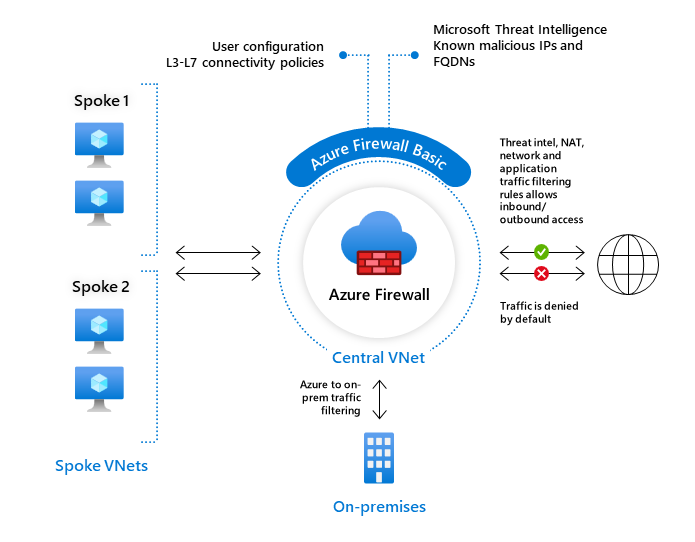
2.1. Azure Firewall Basic
Azure Firewall Basic is like Firewall Standard, but has the following main limitations: - Supports Threat Intel alert mode only - Fixed scale unit to run the service on two virtual machine backend instances - Recommended for environments with an estimated throughput of 250 Mbps
2.2. Azure Firewall Standard
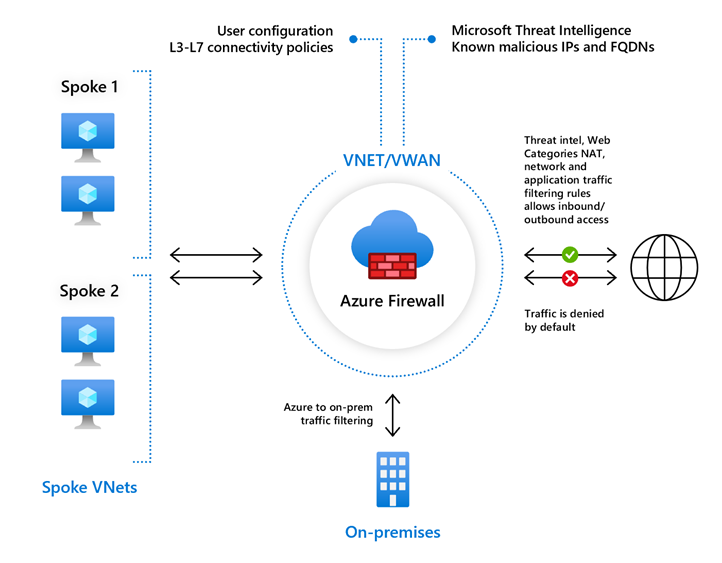
Azure Firewall Standard provides L3-L7 filtering and threat intelligence feeds directly from Microsoft Cyber Security.
2.3. Azure Firewall Premium
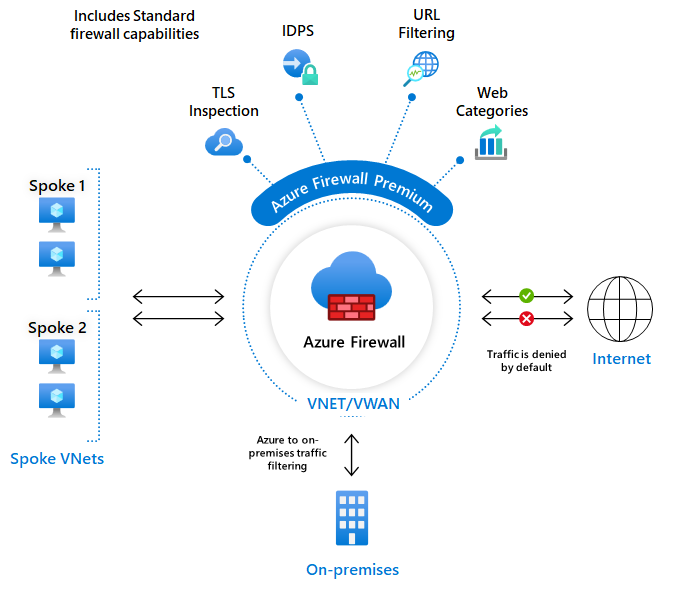
Azure Firewall Premium provides advanced capabilities include signature based IDPS to allow rapid detection of attacks by looking for specific patterns.
3. Network Security Group (NSG)
You can use an Azure network security group to filter network traffic between Azure resources in an Azure virtual network. A network security group contains security rules that allow or deny inbound network traffic to, or outbound network traffic from, several types of Azure resources.
3.1. Default Security rules
Azure creates the following default rules in each network security group that you create.
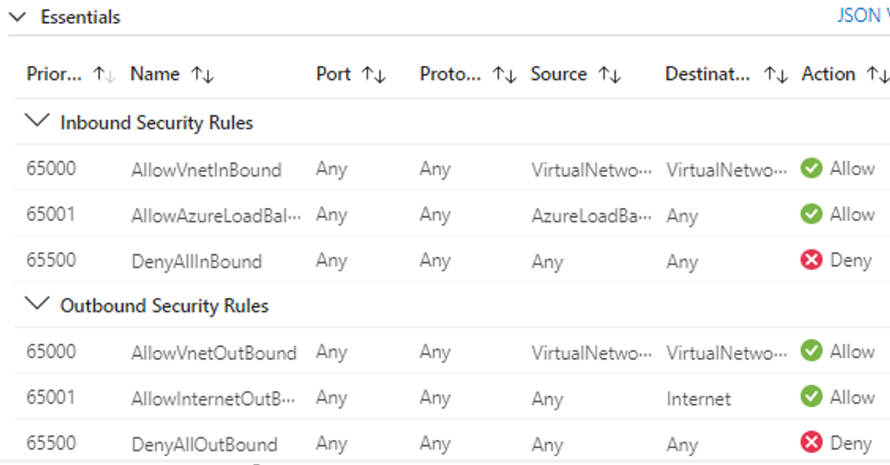
Inbound: - AllowVNetInBound: allow both inbound traffic within the VNet. - AllowAzureLoadBalancerInBound - DenyAllInbound
Outbound: - AllowVnetOutBound: allow both outbound traffic within the VNet. - AllowInternetOutBound - DenyAllOutBound
4. Service Tag
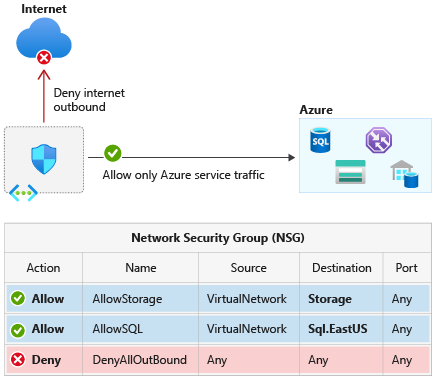
- A service tag represents a group of IP address prefixes from a given Azure service. It helps to minimize the complexity of frequent updates on network security rules.
- You can use service tags to define network access controls on network security groups, Azure Firewall, and user-defined routes.
- By specifying the service tag name, such as ApiManagement, in the appropriate source or destination field of a security rule, you can allow or deny the traffic for the corresponding service.
5. Application Security Group
Application security groups enable network security group (NSG) policies to be defined using logical application groupings rather than individual VM IP addresses, allowing you to group virtual machines and define network security policies based on those groups.
An application security group is a logical collection of virtual machines (NICs). You join virtual machines to the application security group, and then use the application security group as a source or destination in NSG rules.
The following requirements apply to the creation and use of ASGs:
- All network interfaces used in an ASG must be within the same VNet
- If ASGs are used in the source and destination, they must be within the same VNet
Example:
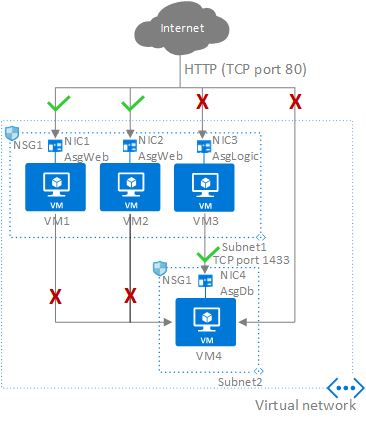
Besides default rules, NSG1 only needs the following rules using ASG.
| Priority | Source | Source ports | Destination | Destination ports | Protocol | Access |
|---|---|---|---|---|---|---|
| 100 | Internet | * | AsgWeb | 80 | TCP | Allow |
| 120 | * | * | AsgDb | 1433 | Any | Deny |
| 110 | AsgLogic | * | AsgDb | 1433 | TCP | Allow |
| Ref: https://blog.hensongroup.com/azure-application-security-group-asg-overview/ | ||||||
| ## 6. Routing Preference |
- Azure routing preference enables you to choose how your traffic routes between Azure and the Internet. You can choose to route traffic either via the Microsoft network, or, via the ISP network (public internet).
- Internet routing preference is only compatible with zone-redundant standard SKU of public IP address. Basic SKU of public IP address isn't supported.
- Internet routing preference currently supports only IPv4 public IP addresses. IPv6 public IP addresses aren't supported.
6.1. Routing over Microsoft global network
Traffic spends the bulk of its path on the Microsoft network => less time on the Internet => More reliable, and more expensive

6.2. Routing cover the public Internet
Traffic spends the bulk of its path on the Internet => less time on the Microsoft network => Less performant and less costly.

7. IP Address
7.1. Public IP address
IP addresses can also be statically assigned or dynamically assigned. Static IP addresses do not change and are best for certain situations such as: - DNS name resolution, where a change in the IP address would require updating host records. - IP address-based security models that require apps or services to have a static IP address. - TLS/SSL certificates linked to an IP address. - Firewall rules that allow or deny traffic using IP address ranges. - Role-based VMs such as Domain Controllers and DNS servers.
7.2. Private IP address
Private IP addresses are used for communication within an Azure Virtual Network, including virtual networks and your on-premises networks. Private IP addresses can be set to dynamic (DHCP lease) or static (DHCP reservation).
Dynamic private IP addresses are assigned through a DHCP lease and can change over the lifespan of the Azure resource.
Static private IP addresses are assigned through a DHCP reservation and don't change throughout the lifespan of the Azure resource. Static private IP addresses persist if a resource is stopped or deallocated.
8. Load balancer
Load balancing refers to efficiently distributing incoming network traffic across a group of backend servers or resources.
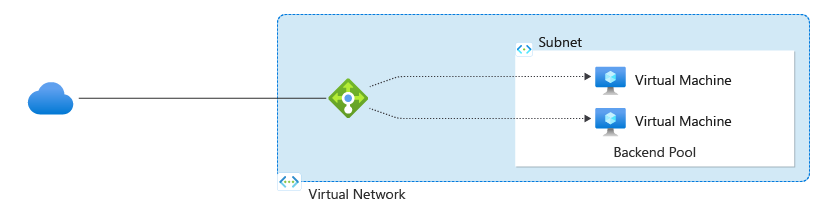
- For public/internal load balancers, only frontend IP configuration is required. Other associated resources can be created after the load balancer is created.
- For public load balancers, you define a public IP address in the frontend IP configuration. For internal load balancers, you define a virtual network in the frontend IP configuration.
- A load balancer rule can't span two virtual networks. All load balancer frontends and their backend instances must be in a single virtual network.
8.1. Load Balancer rules
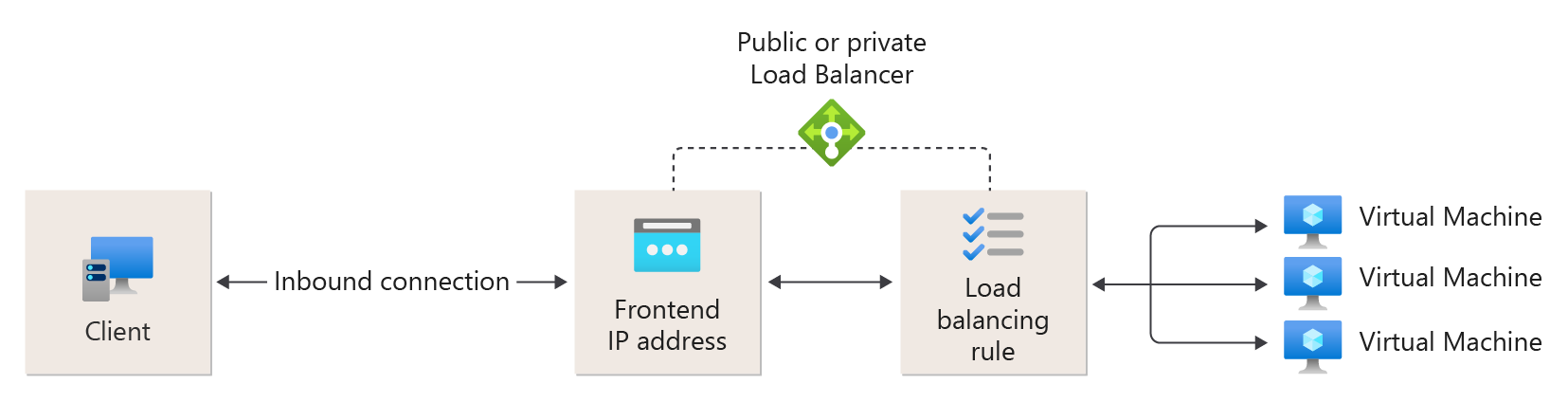
A load balancer rule is used to define how incoming traffic is distributed to all the instances within the backend pool. A load-balancing rule maps a given frontend IP configuration and port to multiple backend IP addresses and ports. Load Balancer rules are for inbound traffic only.
9. Service Endpoint
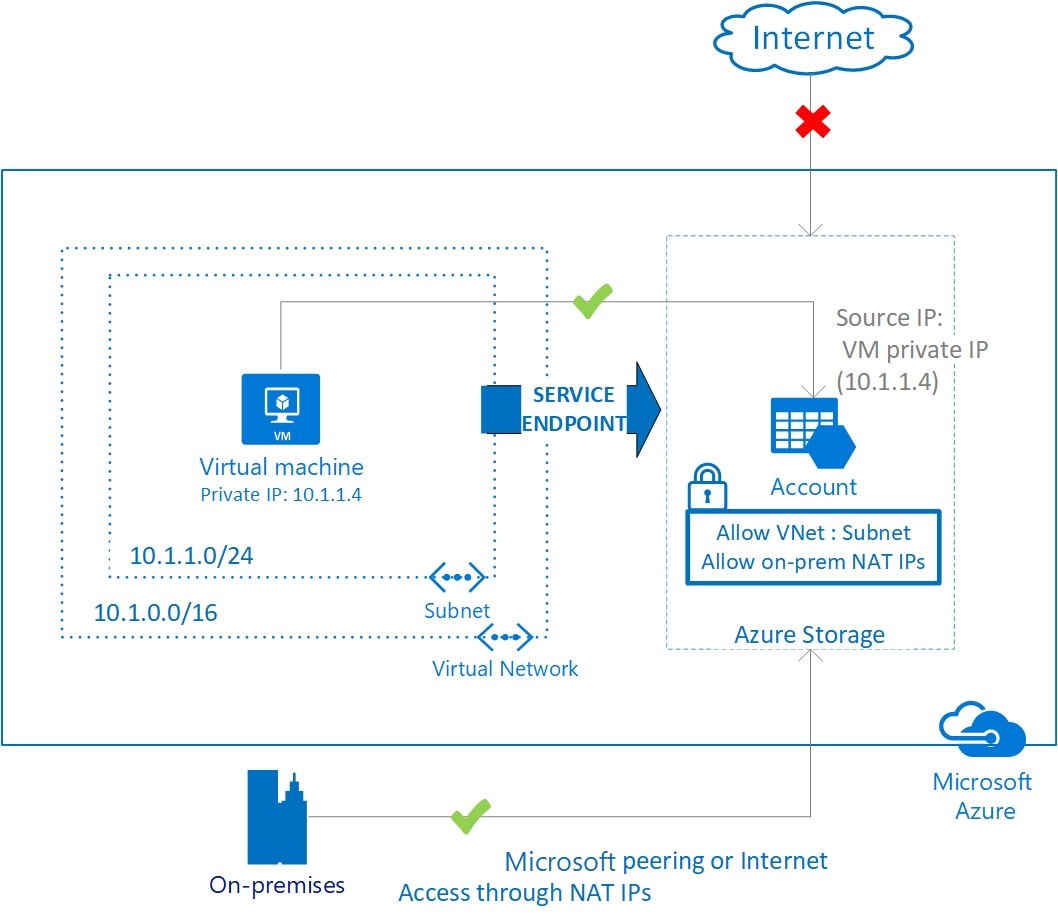
- Virtual Network (VNet) service endpoint provides secure and direct connectivity to Azure services over an optimized route over the Azure backbone network.
- Endpoints allow you to secure your critical Azure service resources to only your virtual networks.
9.1. Service endpoint policy
- The service endpoints are enabled per subnet per service. A service endpoint policy enables you to filter traffic to specific Azure service instances over service endpoints.
10. Private link & Private endpoint
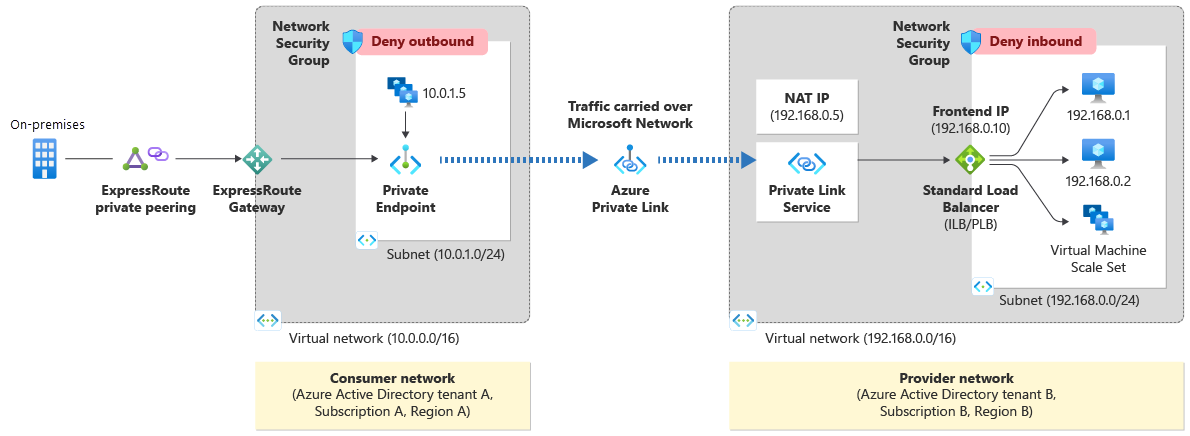
- By enabling a private endpoint, you're bringing the service into your virtual network, other resources in the VNet can comunicate with the service via private IP.
- A private endpoint is a network interface that uses a private IP address from your virtual network. This network interface connects you privately and securely to a service that's powered by Azure Private Link.
Monitoring and Troubleshoot
Azure Network Watcher
IP Flow Verify
which allows you to detect traffic filtering issues at a VM level. IP flow verify checks if a packet is allowed or denied to or from a virtual machine. The information consists of direction, protocol, local IP, remote IP, local port, and remote port. If the packet is denied by a security group, the name of the rule that denied the packet is returned. While any source or destination IP can be chosen, IP flow verify helps administrators quickly diagnose connectivity issues from or to the internet and from or to the on-premises environment.
Azure Traffic Analytics:
11. References
- https://learn.microsoft.com/en-us/azure/load-balancer/
- https://learn.microsoft.com/en-us/answers/questions/638282/static-vs-dynamic-ip-address-for-azure-vm
- https://learn.microsoft.com/en-us/azure/virtual-network/virtual-network-service-endpoints-overview
- https://learn.microsoft.com/en-us/azure/bastion/bastion-overview