Azure Kubernetes Service (AKS)
What is Azure Kubernetes Service (AKS)?
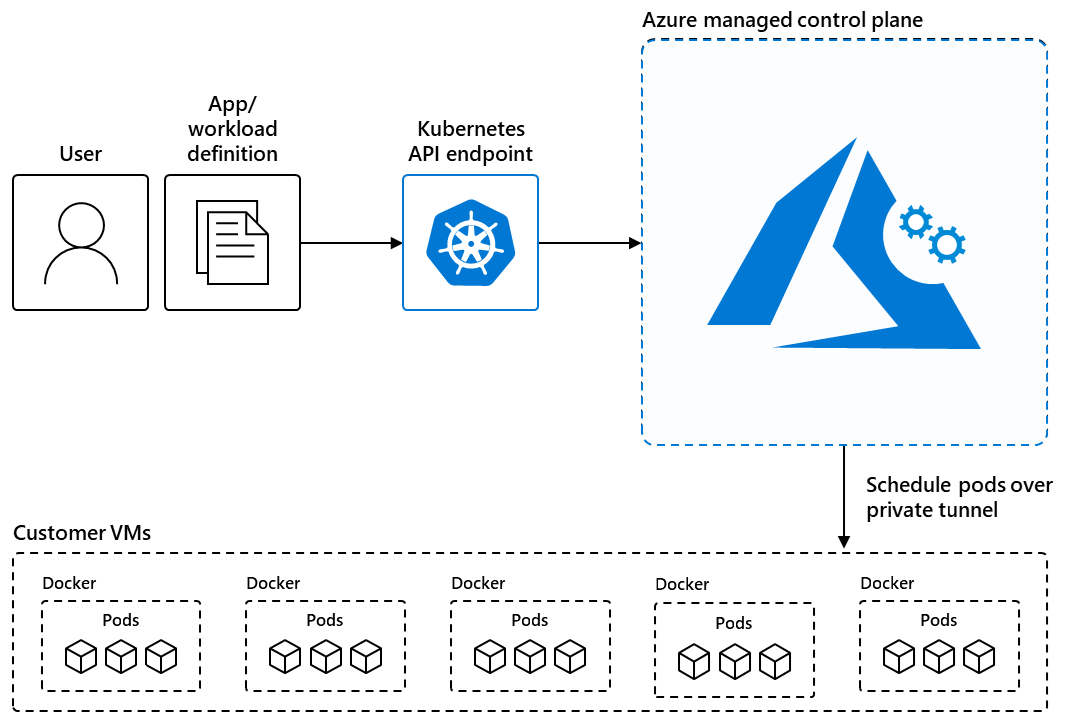
Azure Kubernetes Service (AKS) is a managed Kubernetes service that you can use to deploy and manage containerized applications. You need minimal container orchestration expertise to use AKS. AKS reduces the complexity and operational overhead of managing Kubernetes by shifting that responsibility to Azure.
Scale
Manually scale pods or nodes
To manually scale, you define the replica or node count. The Kubernetes API then schedules creating more pods or the draining of nodes based on that replica or node count.
Horizontal pod autoscaler
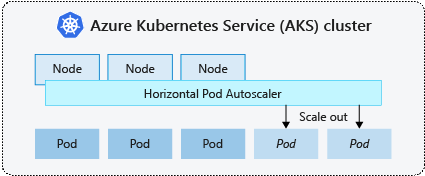
Kubernetes uses the horizontal pod autoscaler (HPA) to monitor the resource demand and automatically scale the number of pods.
When changes are required, the number of replicas is increased or decreased accordingly. HPA works with AKS clusters that deployed the Metrics Server for Kubernetes version 1.8 and higher.
Cluster autoscaler
the Kubernetes cluster autoscaler adjusts the number of nodes based on the requested compute resources in the node pool.
The cluster autoscaler is typically used alongside the horizontal pod autoscaler. When combined, the horizontal pod autoscaler increases or decreases the number of pods based on application demand, and the cluster autoscaler adjusts the number of nodes to run more pods.

Burst to Azure Container Instances (ACI)
If your application needs to rapidly scale, the horizontal pod autoscaler may schedule more pods than can be provided by the existing compute resources in the node pool.
ACI lets you quickly deploy container instances without extra infrastructure overhead. When you connect with AKS, ACI becomes a secured, logical extension of your AKS cluster. The virtual nodes component is installed in your AKS cluster that presents ACI as a virtual Kubernetes node. Kubernetes can then schedule pods that run as ACI instances through virtual nodes, not as pods on VM nodes directly in your AKS cluster.

Built-in roles
- Azure Kubernetes Service Contributor Role: access to read and write Azure Kubernetes Service clusters, can change roles and bindings
- The Azure Kubernetes Service Cluster Admin role: provides permissions to list cluster admin credential actions only.
- The Azure Kubernetes Service RBAC Writer role: cannot modify roles and role bindings.
- The Azure Kubernetes Service Cluster User role: can only list user credential access.
References
- https://learn.microsoft.com/en-us/azure/aks/concepts-scale