Azure Backup
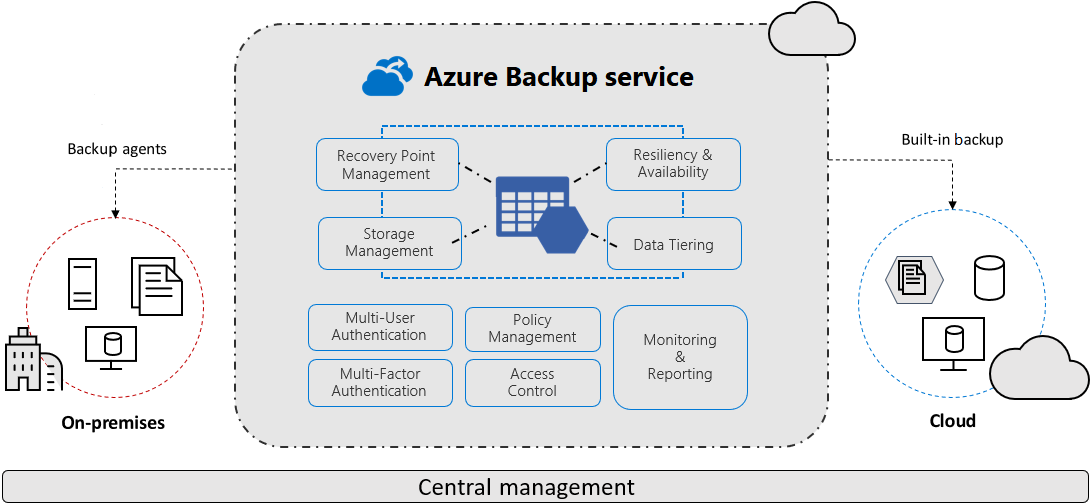
| Backup type | Description |
|---|---|
| On-premises | Back up files, folders, and system state with the Microsoft Azure Recovery Services (MARS) agent. You can also use System Center Data Protection Manager (DPM) or the Microsoft Azure Backup Server (MABS) agent to protect on-premises virtual machines (both Hyper-V and VMware) and other on-premises workloads. |
| Azure Virtual Machines | Back up entire Windows or Linux virtual machines (by using backup extensions), or back up files, folders, and system state with the MARS agent. |
| Azure Files | Back up Azure file shares to a storage account. |
| SQL Server in Azure virtual machines | Back up SQL Server databases running on Azure virtual machines. |
| SAP HANA databases in Azure virtual machines | Back up SAP HANA databases running on Azure virtual machines. |
| Microsoft cloud | Azure Backup can replace your existing on-premises or off-site backup solution with a cloud-based solution that's reliable, secure, and cost-competitive. |
The primary differences are the types of supported data sources and Azure products.
-
Azure Backup vault: Azure Backup vaults are used with Azure Backup only. Supported data sources include Azure Database for PostgreSQL servers, Azure blobs, and Azure disks.
-
Azure Recovery Services vault: Azure Recovery Services vaults can be used with Azure Backup or Azure Site Recovery. Supported data sources include Azure virtual machines, SQL or SAP HANA in an Azure virtual machine, and Azure file shares. You can back up data to a Recovery Services vault from Azure Backup Server, Azure Backup Agent, and System Center Data Protection Manager.
Backup vault
-
Supports only Azure Disks and Blob Containers
-
Each datasource requires a separate backup policy
-
Partial backups can only be configured for custom backups by uploading a _backup.filter
References
- https://learn.microsoft.com/en-us/training/modules/design-solution-for-backup-disaster-recovery/3-design-for-azure-backup