Azure Container Service
Azure container service
File share
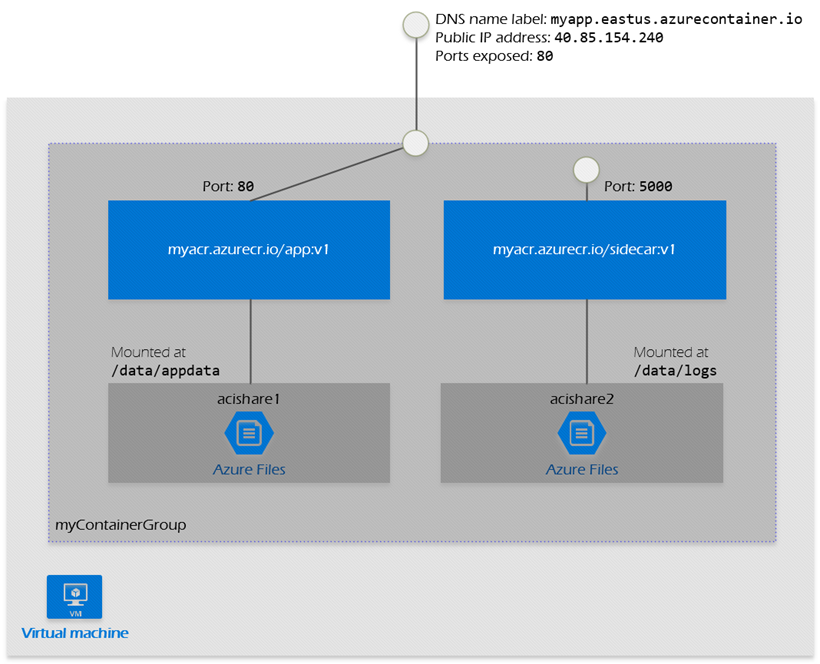
You can mount an Azure file share, created in Azure Files, as a volume into a container directory in Azure Container Instances.
Restart policies
The ‘always’ restart policy will always restart the container, irrespective of the exit code. The container will run more than once.
The ‘never’ restart policy never attempts to restart the container, irrespective of the exit code. The container runs at most once (with a failed status). Option B is the correct answer.
The ‘OnFailure’ restart policy will restart the container only if it exits with a non-zero exit code. Since the container exits with an exit code of 1 every time, the container will also run more than once.
Container group
A container group is a collection of containers that get scheduled on the same host machine. The containers in a container group share a lifecycle, resources, local network, and storage volumes. It's similar in concept to a pod in Kubernetes.
Container groups can share an external-facing IP address, one or more ports on that IP address, and a DNS label with a fully qualified domain name (FQDN).
Within a container group, container instances can reach each other via localhost on any port, even if those ports aren't exposed externally on the group's IP address or from the container.