Azure Event - Message services
1. Events vs. messages
An event is a lightweight notification of a condition or a state change. The publisher of the event has no expectation about how the event is handled. The consumer of the event decides what to do with the notification. Events can be discrete units or part of a series.
A message is raw data produced by a service to be consumed or stored elsewhere. The message contains the data that triggered the message pipeline. The publisher of the message has an expectation about how the consumer handles the message
2. Azure Event Grid
Azure Event Grid is a highly scalable, fully managed Pub Sub message distribution service that offers flexible message consumption patterns using the Message Queueing Telemetry Transport (MQTT) and HTTP protocols. With Azure Event Grid, you can build data pipelines with device data, integrate applications, and build event-driven serverless architectures.

3. Azure Event Grid - Use cases
3.1. MQTT messaging
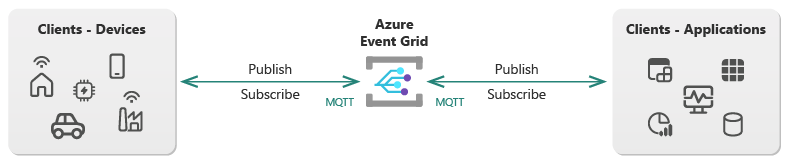
Event Grid enables your clients to communicate on custom MQTT topic names using a publish-subscribe messaging model
3.1.1. Ingest IoT telemetry
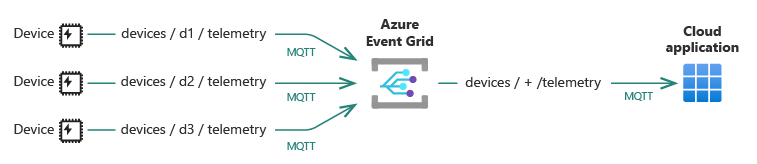
Ingest telemetry using a many-to-one messaging pattern. For example, use Event Grid to send telemetry from multiple IoT devices to a cloud application.
3.1.2. Command and control
Control your MQTT clients using the request-response (one-to-one) message pattern. For example, use Event Grid to send a command from a cloud application to an IoT device.

3.1.3. Broadcast alerts
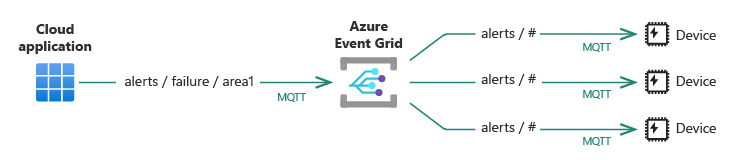
Broadcast alerts to a fleet of clients using the one-to-many messaging pattern. For example, use Event Grid to send an alert from a cloud application to multiple IoT devices. This pattern enables the application to publish only one message that the service replicates for every interested client.
3.1.4. Integrate MQTT data
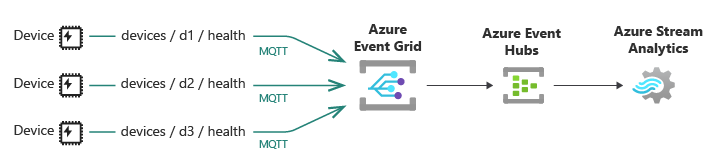 Integrate data from your MQTT clients by routing MQTT messages to Azure services and custom endpoints through push delivery or pull delivery. For example, use Event Grid to route telemetry from your IoT devices to Event Hubs and then to Azure Stream Analytics to gain insights from your device telemetry.
3.2. Push delivery of events
3.2.1. Build event-driven serverless solutions

For example, Using serverless services with Event Grid affords you a level of productivity, effort economy, and integration superior to that of classical computing models where you have to procure, manage, secure, and maintain all infrastructure deployed.
3.2.2. Receive events from Azure services

Event Grid can receive events from 20+ Azure services so that you can automate your operations.
3.2.3. Receive events from your applications
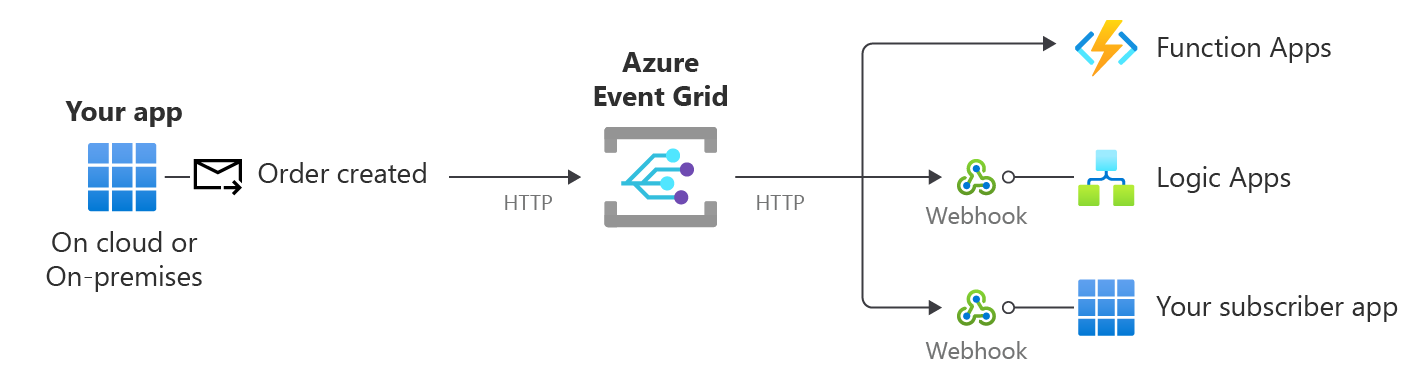
Your own service or application publishes events to Event Grid that subscriber applications process. Event Grid features Namespace Topics to address integration and routing requirements at scale with a simple resource model. You can also use Custom Topics to meet basic integration requirements and Domains for a simple management and routing model when you need to distribute events to hundreds or thousands of different groups.
3.2.4. Receive events from partner (SaaS providers)
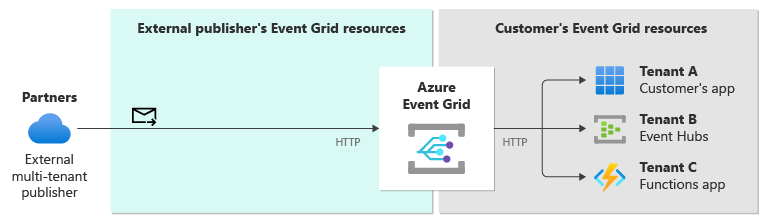
3.3. Pull delivery of discrete events
3.3.1. Receive events at your own pace
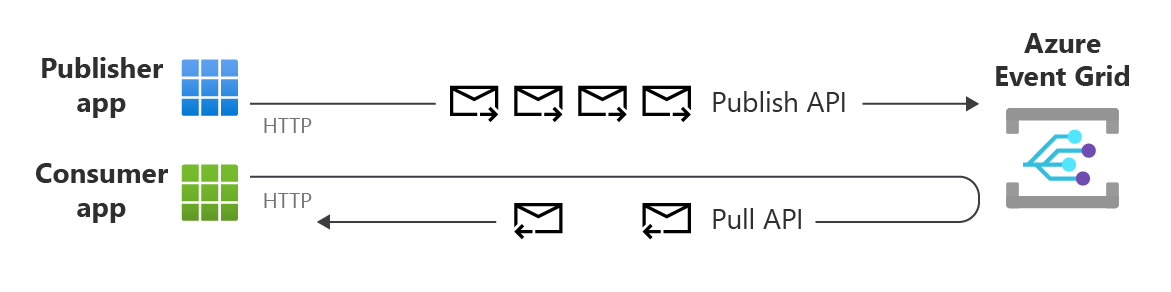 One or more clients can connect to Azure Event Grid to read messages at their own pace.
3.3.2. Consume events over a private link
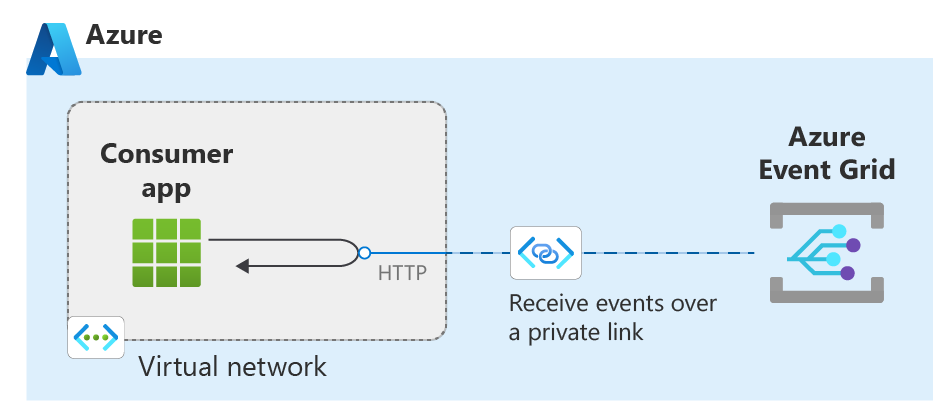
4. Azure Event Hubs
Azure Event Hubs is a native data-streaming service in the cloud that can stream millions of events per second, with low latency, from any source to any destination. Event Hubs is compatible with Apache Kafka. It enables you to run existing Kafka workloads without any code changes.
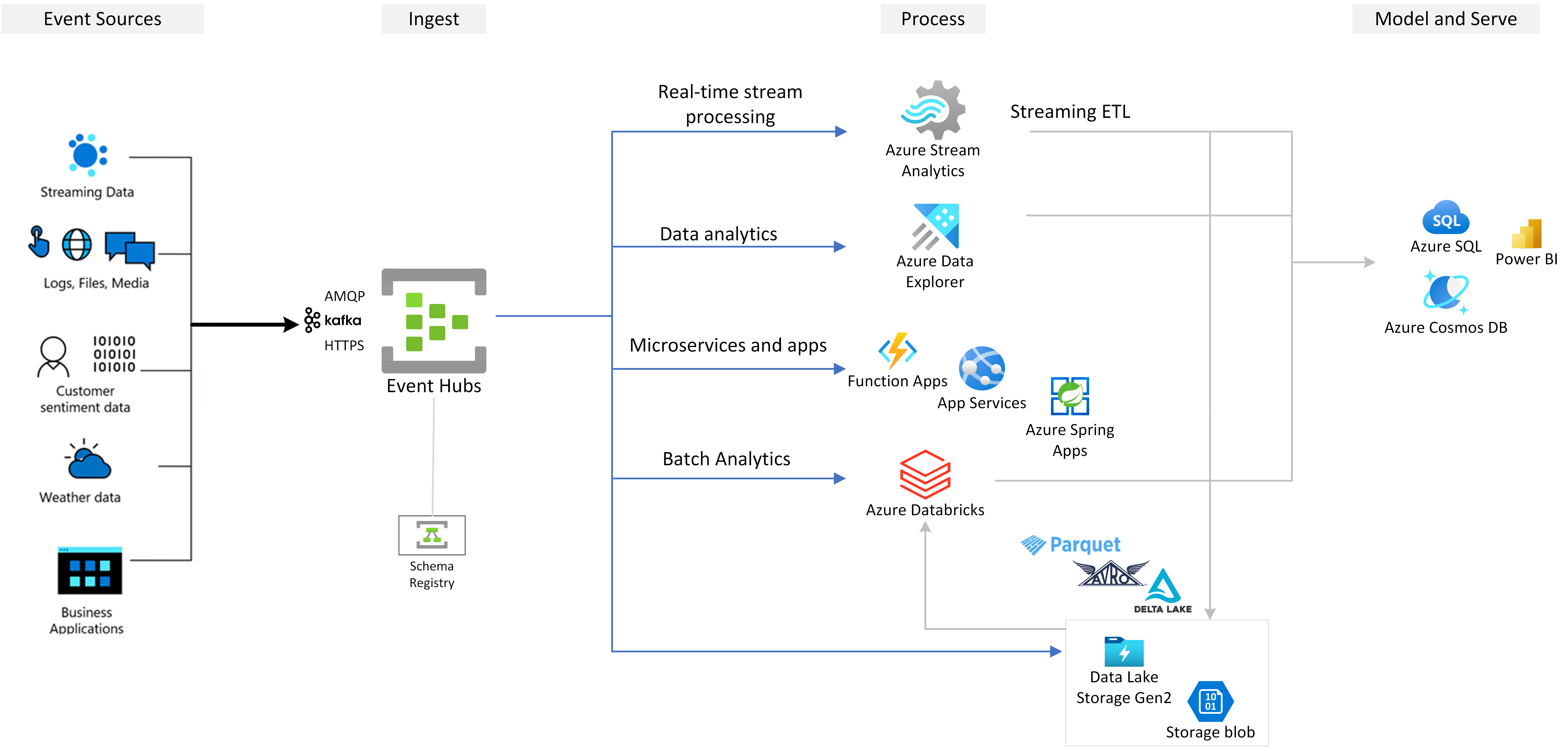
- Event Hubs is a multi-protocol event streaming engine that natively supports Advanced Message Queuing Protocol (AMQP), Apache Kafka, and HTTPS protocols
- Azure Schema Registry in Event Hubs provides a centralized repository for managing schemas of event streaming applications
- Event Hubs integrates with Azure Stream Analytics to enable real-time stream processing.
5. Azure Service Bus
Azure Service Bus is a fully managed enterprise message broker with message queues and publish-subscribe topics. Service Bus is used to decouple applications and services from each other, providing the following benefits:
- Load-balancing work across competing workers
- Safely routing and transferring data and control across service and application boundaries
- Coordinating transactional work that requires a high-degree of reliability
5.1. Queues
Messages are sent to and received from queues. Queues store messages until the receiving application is available to receive and process them.

5.2. Topics
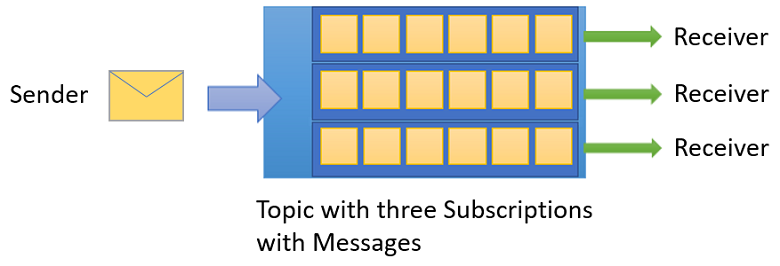
You can also use topics to send and receive messages. While a queue is often used for point-to-point communication, topics are useful in publish-subscribe scenarios.
5.3. Namespaces
A namespace is a container for all messaging components (queues and topics). A namespace can have one or more queues and topics and it often serves as an application container.
6. Comparison
| Service | Purpose | Type | When to use |
|---|---|---|---|
| Event Grid | Reactive programming is a powerful event routing service provided by Azure that simplifies the implementation of event-driven architectures |
Event distribution (discrete events) | React to status changes |
| Event Hubs | Big data pipeline Central hub for ingesting and processing large volumes of events from multiple sources. |
Event streaming (series) | Telemetry and distributed data streaming |
| Service Bus | High-value enterprise messaging is a reliable messaging service that provides scalability for messaging scenarios. |
Message | Order processing and financial transactions |
| Messaging solution | Example scenarios |
|---|---|
| Azure Queue Storage | You want a simple queue to organize messages. You need an audit trail of all messages that pass through the queue. You expect the queue storage to exceed 80 GB. You'd like to track progress for processing a message inside of the queue. |
| Azure Service Bus message queues |
You require an at-most-once delivery guarantee. You require at-least-once message processing (PeekLock receive mode). You require at-most-once message processing (ReceiveAndDelete receive mode). You want to group messages into transactions. You want to receive messages without polling the queue. You need to handle messages larger than 64 KB. You expect the queue storage won't exceed 80 GB. You'd like to publish and consume batches of messages. |
| Azure Service Bus publish-subscribe topics |
You need multiple receivers to handle each message. You expect multiple destinations for a single message but need queue-like behavior. |
| ## 7. Use the services together |
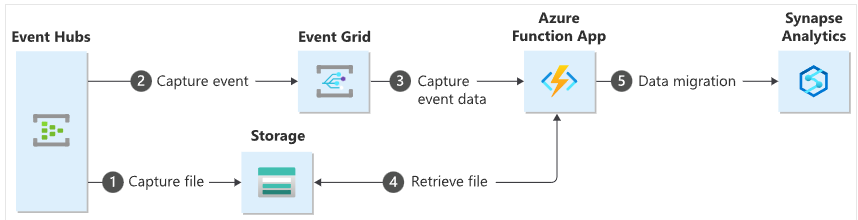 This diagram depicts the workflow of the solution you build in this tutorial:
- Data sent to an Azure event hub is captured in an Azure blob storage.
- When the data capture is complete, an event is generated and sent to Azure Event Grid.
- Azure Event Grid forwards this event data to an Azure function app.
- The function app uses the blob URL in the event data to retrieve the blob from the storage.
- The function app migrates the blob data to an Azure Synapse Analytics.
8. References
- Demystifying Azure’s Eventing Services: A Comparison of Event Hub, Event Grid, and Service Bus
- https://learn.microsoft.com/en-us/azure/service-bus-messaging/compare-messaging-services
- https://learn.microsoft.com/en-us/azure/event-hubs/event-hubs-about