Azure Virtual Machine
1. Virtual Machine (VM) components
Provisioning a virtual machine (VM) in Azure requires additional components besides the VM itself, including networking and storage resources. This article shows best practices for running a secure Windows VM on Azure.
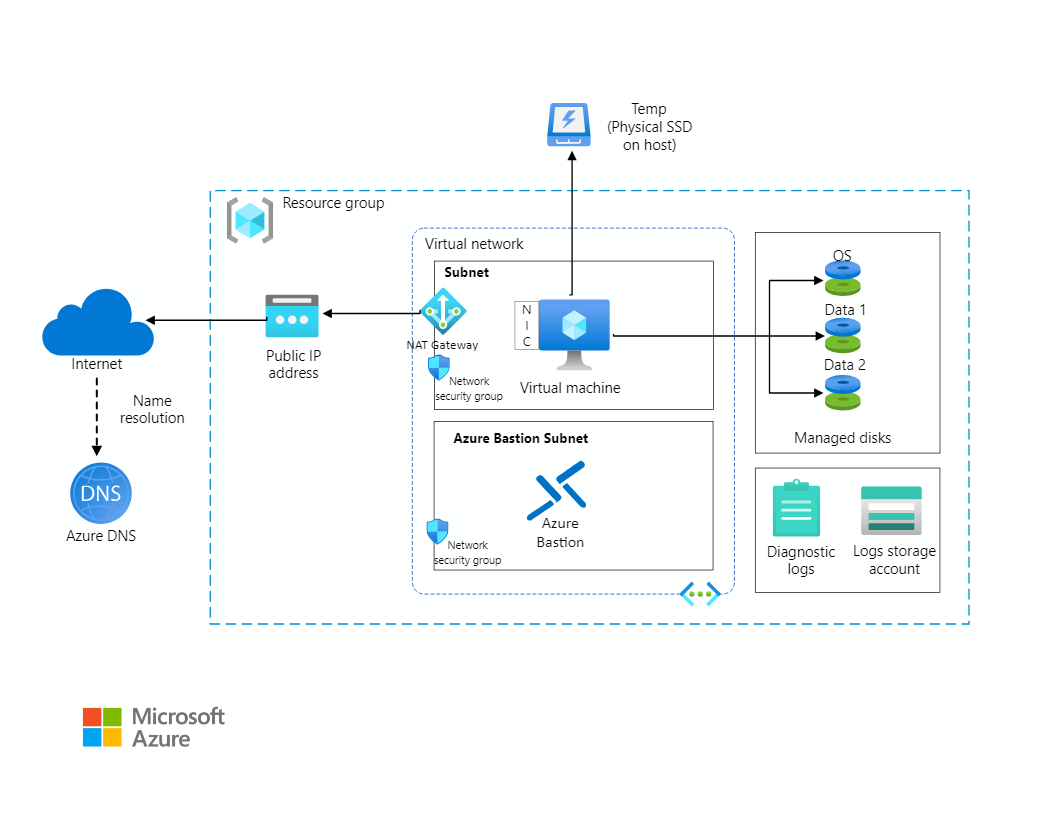
2. NIC (Network Interface)
- Each VM requires at least one dedicated NIC, irrespective of the VM’s status, even if a VM is not running, you cannot detach its last NIC.
- Only NICs deployed in the same virtual network can be added to a VM.
- Deleting a VM doesn't delete the network interfaces that are attached to it.
- By default, the first NIC attached to the VM is the primary network interface. All other NICs subsequently added to the VM are secondary ones.
- You can control which network interface you send outbound traffic to. However, a VM by default sends all outbound traffic to the IP address that's assigned to the primary IP configuration of the primary network interface.
- You need a default gateway only for communication between subnets. For intra-subnet communication, there is no need for a default gateway.
- Only the primary NIC attached to a VM is assigned a default gateway. The secondary NIC isn't. This default gateway is required for bidirectional communications outside the subnet. So, any systems from outside the subnet can communicate with the secondary NIC.
3. Disk
3.1. Disk types
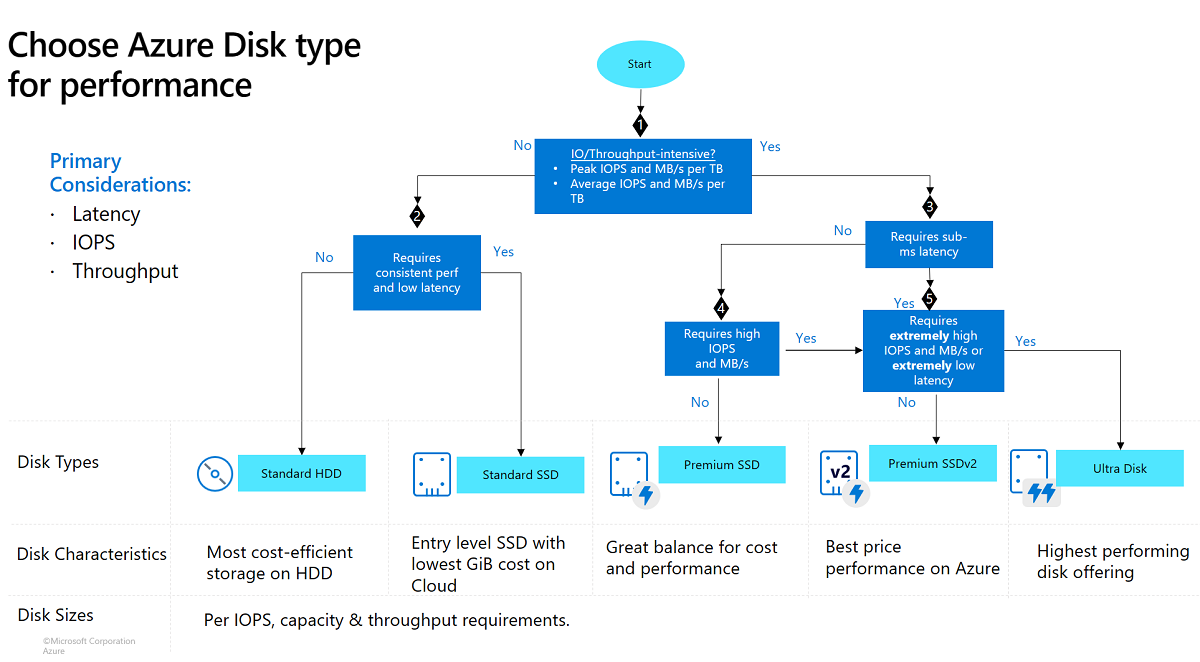
3.2. Redundancy
- Azure managed disks offer two storage redundancy options, zone-redundant storage (ZRS), and locally redundant storage.
3.3. Disk roles
There are three disk roles in Azure:
- The OS disk, which has the Operating System and is generally a C drive in Windows VM.
- Temporary disk, which provides short-term storage for your apps and processes, and is generally a D drive on Windows VM.
- Finally, any number of data disks attached to the VM, dependent on the virtual machine size. In the given scenario, they are drives, E and F.
VM size/family
Ref: Sizes for virtual machines in Azure
- Lsv2 are high disk throughput and IO virtual machines.
- F are high CPU to memory ratio virtual machines used for web servers and such.
- Esv3 are high memory to CPU ratio virtual machines used for databases, but not optimized for throughput and IO.
- NCv2 are GPU based virtual machines.
4. Resource group
- VM resources have links with each other, however, you can move any of those resources to a different resource group in the same subscription. It's a good practice to move all VM resources together.
5. VM Agent
- The VM Agent is a secure, lightweight process that manages virtual machine (VM) interaction with the Azure fabric controller.
- The Azure Windows VM Agent has a primary role in enabling and executing Azure virtual machine extensions.
- The Linux agent providing provisioning functionality, Azure provides the option of using cloud-init for some Linux operating systems.
- Creates a user account
- Configures SSH authentication types
- Manages routes to improve compatibility with platform DHCP servers
- ...
6. Extension
- Extensions are small applications that provide post-deployment configuration and automation on Azure virtual machines (VMs).
- The Azure platform hosts many extensions covering VM configuration, monitoring, security, and utility applications. Publishers take an application, wrap it into an extension, and simplify the installation.
- The VM Agent is required to manage, install and execute extensions. If the VM Agent isn't running or is failing to report a Ready status to the Azure platform, then the extensions won't work correctly.
7. Quotas
- The vCPU quotas for virtual machines and scale sets are arranged in two tiers for each subscription, in each region. The first tier is the Total Regional vCPUs, and the second tier is the various VM size family cores such as the D-series vCPUs.
- Quota is calculated based on the total number of cores in use both allocated and deallocated. If you need additional cores, request a quota increase or delete VMs that are no longer needed.
8. Resize
- In some cases, you must deallocate the VM first. Deallocation may be necessary if the new size isn't available on the same hardware cluster that is currently hosting the VM.
- It is important to understand that even when deallocation is not necessary, if the virtual machine is currently running, changing its size will cause it to restart. For this reason you should consider changing VM size as a disruptive procedure, especially for stateful workloads that are hosted on the VM.
- Deallocating the VM also releases any dynamic IP addresses assigned to the VM. The OS and data disks are not affected.
9. Moving VM
To move across subscriptions, the resource & its dependent resources must be located in the same resource group and they must be moved together. For example, a VM with managed disks would require the VM and the managed disks to be moved together, along with other dependent resources.
10. Adding and removing components
- VM must be stopped before adding a NIC to a VM
- You need azure VM agent on a running VM before adding a VM extension.
- You can attach/detach a disk to/from a VM in any VM status.
11. Reapply
You can reapply your virtual machine’s state. The reapply operation will provision the VM again on the same host (server) using the previously stable virtual machine configuration.
12. Redeploy
Since a redeploy operation deploys the VM on a different host, you will lose all the data on the temp disk (e.g. Drive D) is located on the same physical server where the VM is originally hosted.
13. Bastion Host
Azure Bastion is a fully managed PaaS service that you provision to securely connect to virtual machines via private IP address
13.1. Deployment - Basic SKU and higher
An instance is an optimized Azure VM that is created when you configure Azure Bastion. When you configure Azure Bastion using the Basic SKU, 2 instances are created. If you use the Standard SKU, you can specify the number of instances between 2-50.
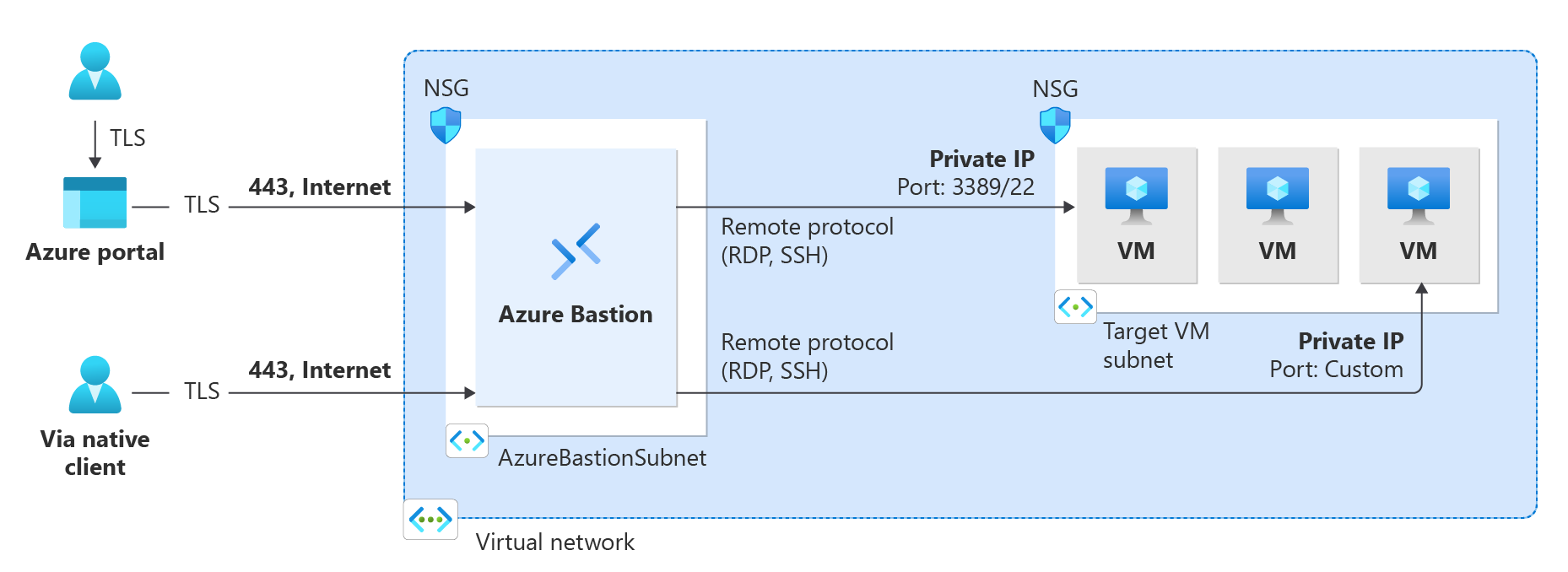
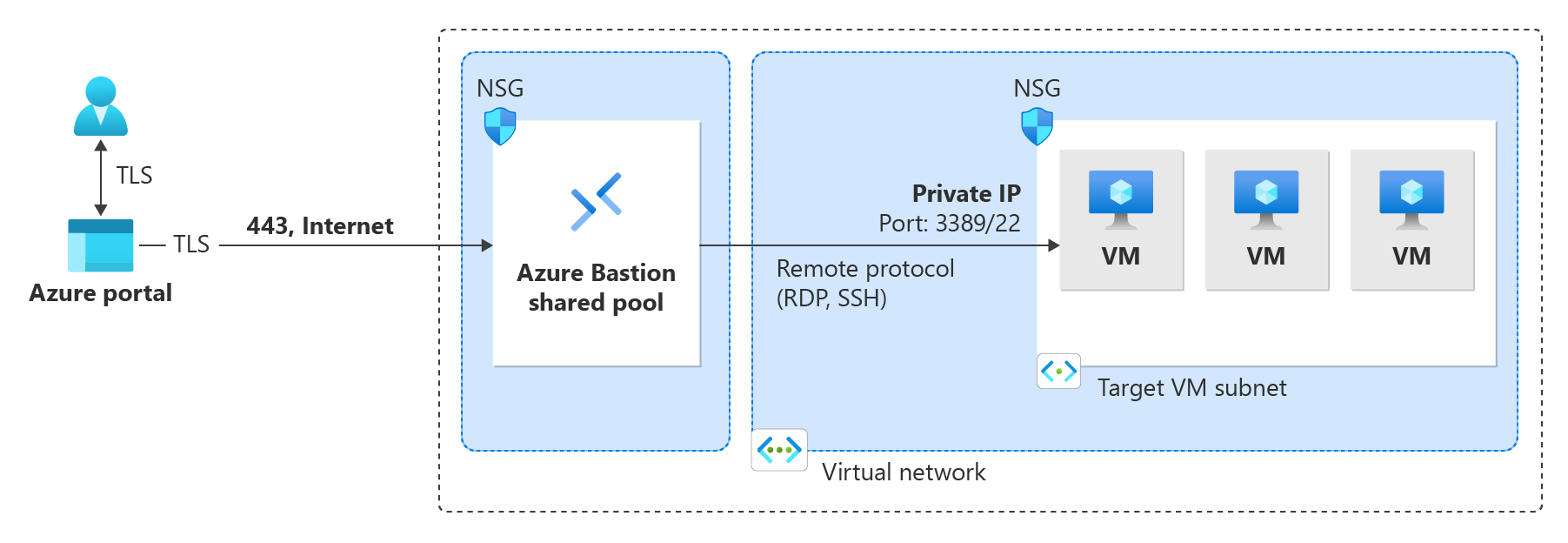
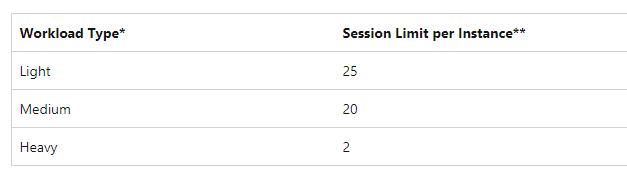 When working with the Basic SKU or higher, Bastion uses the following architecture and workflow.
- The Bastion host is deployed in the virtual network that contains the
When working with the Basic SKU or higher, Bastion uses the following architecture and workflow.
- The Bastion host is deployed in the virtual network that contains the AzureBastionSubnet subnet that has a minimum /26 prefix.
- The user connects to the Azure portal using any HTML5 browser and selects the virtual machine to connect to. A public IP address is not required on the Azure VM.
- The RDP/SSH session opens in the browser with a single click.
13.2. Deployment - Developer SKU
The Bastion Developer SKU is a free, lightweight SKU. This SKU is ideal for Dev/Test users who want to securely connect to their VMs, but don't need additional Bastion features or host scaling. With the Developer SKU, you can connect to one Azure VM at a time directly through the virtual machine connect page.
Azure Dedicated Hosts
Ref: https://learn.microsoft.com/en-us/azure/virtual-machines/dedicated-hosts#groups-hosts-and-vms
Azure Dedicated Host is a service that provides physical servers able to host one or more virtual machines assigned to one Azure subscription
Groups, hosts, and VMs
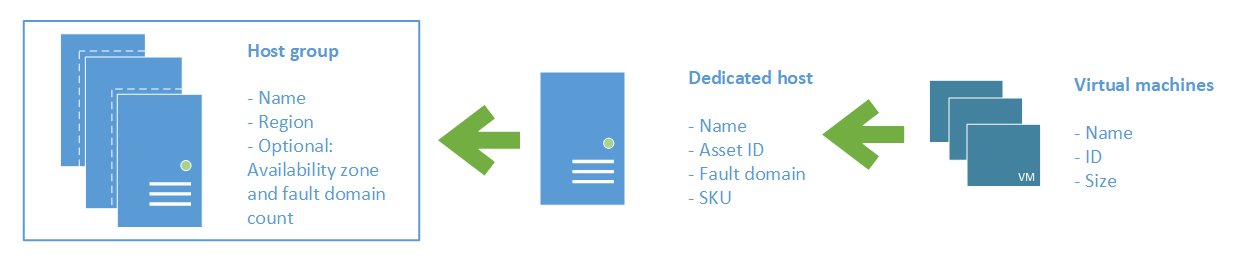
A host group is a resource that represents a collection of dedicated hosts. You create a host group in a region and an availability zone, and add hosts to it.
A host is a resource, mapped to a physical server in an Azure data center. The physical server is allocated when the host is created. A host is created within a host group. A host has a SKU describing which VM sizes can be created.
14. References
- https://learn.microsoft.com/en-us/azure/architecture/reference-architectures/n-tier/windows-vm
- https://learn.microsoft.com/en-us/azure/virtual-machines/quotas?tabs=cli
- https://learn.microsoft.com/en-us/azure/virtual-machines/extensions/overview
- https://learn.microsoft.com/en-us/azure/virtual-machines/extensions/troubleshoot
- https://learn.microsoft.com/en-us/azure/virtual-machines/managed-disks-overview#disk-roles
END