Azure API Management
Azure API Management is made up of an API gateway, a management plane, and a developer portal. These components are Azure-hosted and fully managed by default. API Management is available in various tiers differing in capacity and features.
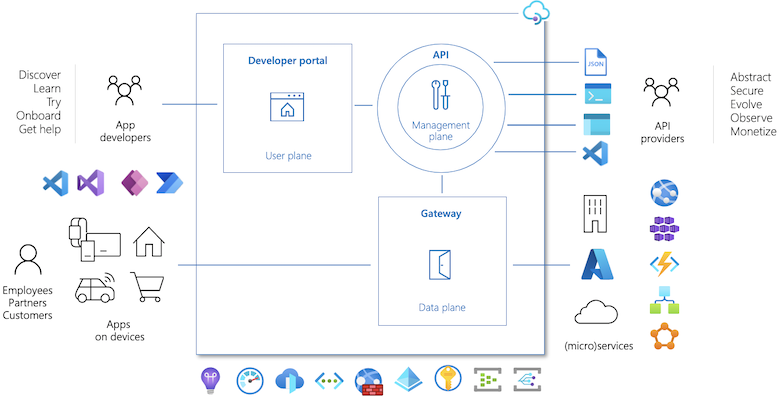
Application Gateway vs API Management
Ref: https://learn.microsoft.com/en-us/answers/questions/1065016/difference-between-application-gateway-and-api-man
| API Management | App Gateway |
|---|---|
| Provides functionality for you to deliver API's to your customers such as: - Controlled exposure of API's letting you restrict what API's you reveal to the outside world - Authenticaiton to your API's using subscription keys, Azure AD, JWT etc. - Product and subscription management including self service through a developer portal - Rate limiting and other security controls - Custom policies to intercept and adapt requests as required |
Is essentially a layer 7 load balancer. You can put App Gateway as the entry point of your applicaitons and have it direct traffic to the right location. It provides: - Security as a single point of entry into your application and the only thing exposed to the internet - Routing to allow you to direct a public URL to a prive application URL, or have path based routing go to different apps etc. - An optional Web Application Firewall to protect from OWASP top 10 attacks and similar |
- If you just have a web application that is not exposing API's to the end user then generally APIM won't be of much benefit and you can just implement App Gateway to handle routing and security.
- If you are offering API's then you may want the features of APIM to help you expose your API's securely and provide better services for the user. In this scenario you might also consider using App Gateway as well as APIM, primarily if you want to implement the Webb Application Firewall (WAF) features.
- APIM does not provide a WAF so if you want that protection you can look at App Gateway.
API Management in front of AKS
Option 1: Expose Services publicly
Services in an AKS cluster can be exposed publicly using Service types of NodePort, LoadBalancer, or ExternalName. In this case, Services are accessible directly from public internet. After deploying API Management in front of the cluster, we need to ensure all inbound traffic goes through API Management by applying authentication in the microservices.
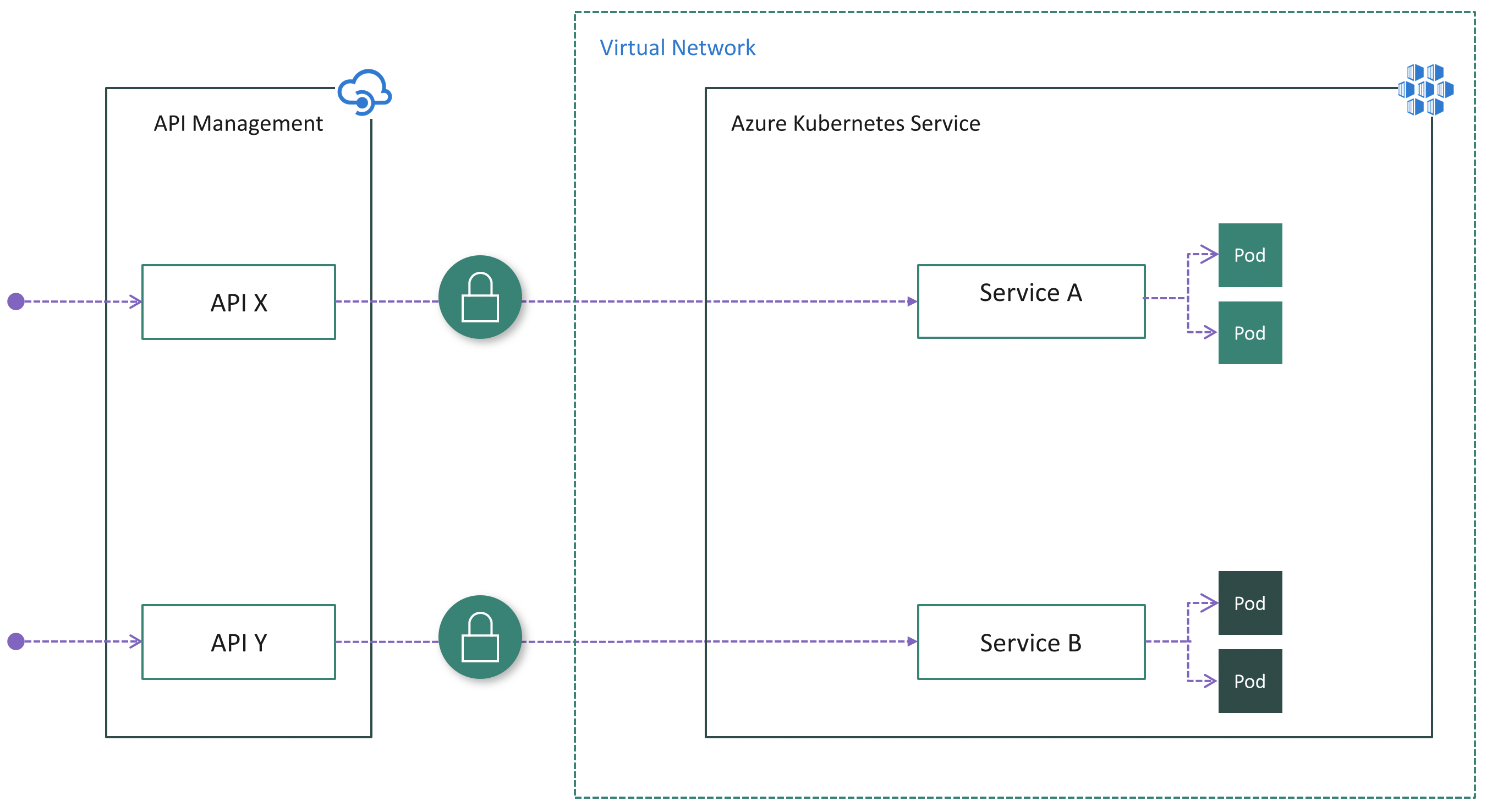
Pros:
- Easy configuration on the API Management side because it doesn't need to be injected into the cluster VNet
- No change on the AKS side if Services are already exposed publicly and authentication logic already exists in microservices
Cons:
- Potential security risk due to public visibility of endpoints
- No single-entry point for inbound cluster traffic
- Complicates microservices with duplicate authentication logic
Option 2: Install an Ingress Controller
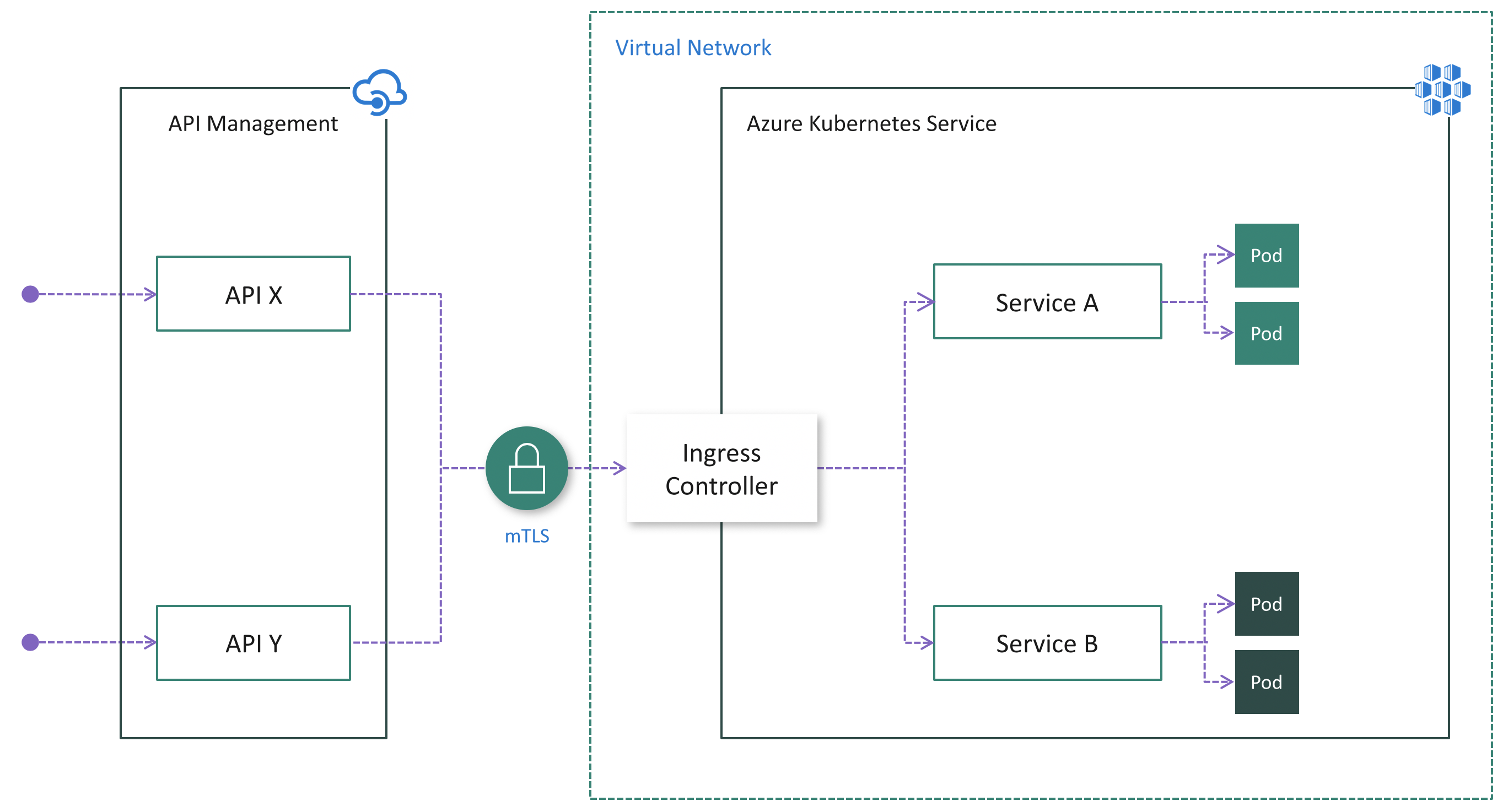
Pros:
- Easy configuration on the API Management side because it doesn't need to be injected into the cluster VNet and mTLS is natively supported
- Centralizes protection for inbound cluster traffic at the Ingress Controller layer
- Reduces security risk by minimizing publicly visible cluster endpoints
Cons:
- Increases complexity of cluster configuration due to extra work to install, configure and maintain the Ingress Controller and manage certificates used for mTLS
- Security risk due to public visibility of Ingress Controller endpoint(s) unless API Management Standard v2 or Premium tier is being used.
Option 3: Deploy APIM inside the cluster VNet
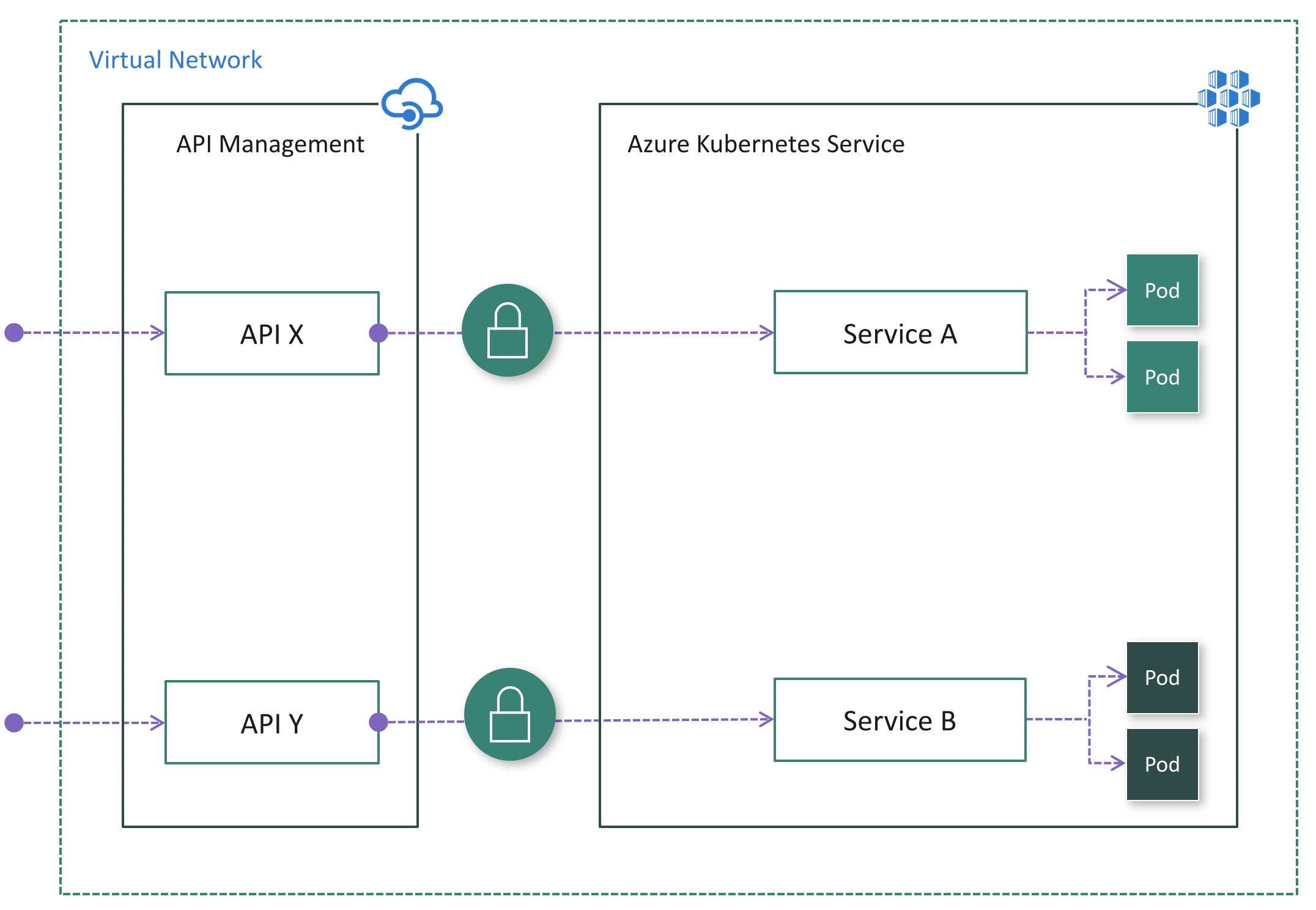
If all API consumers reside within the cluster VNet, then the Internal mode (Fig. 5) could be used.
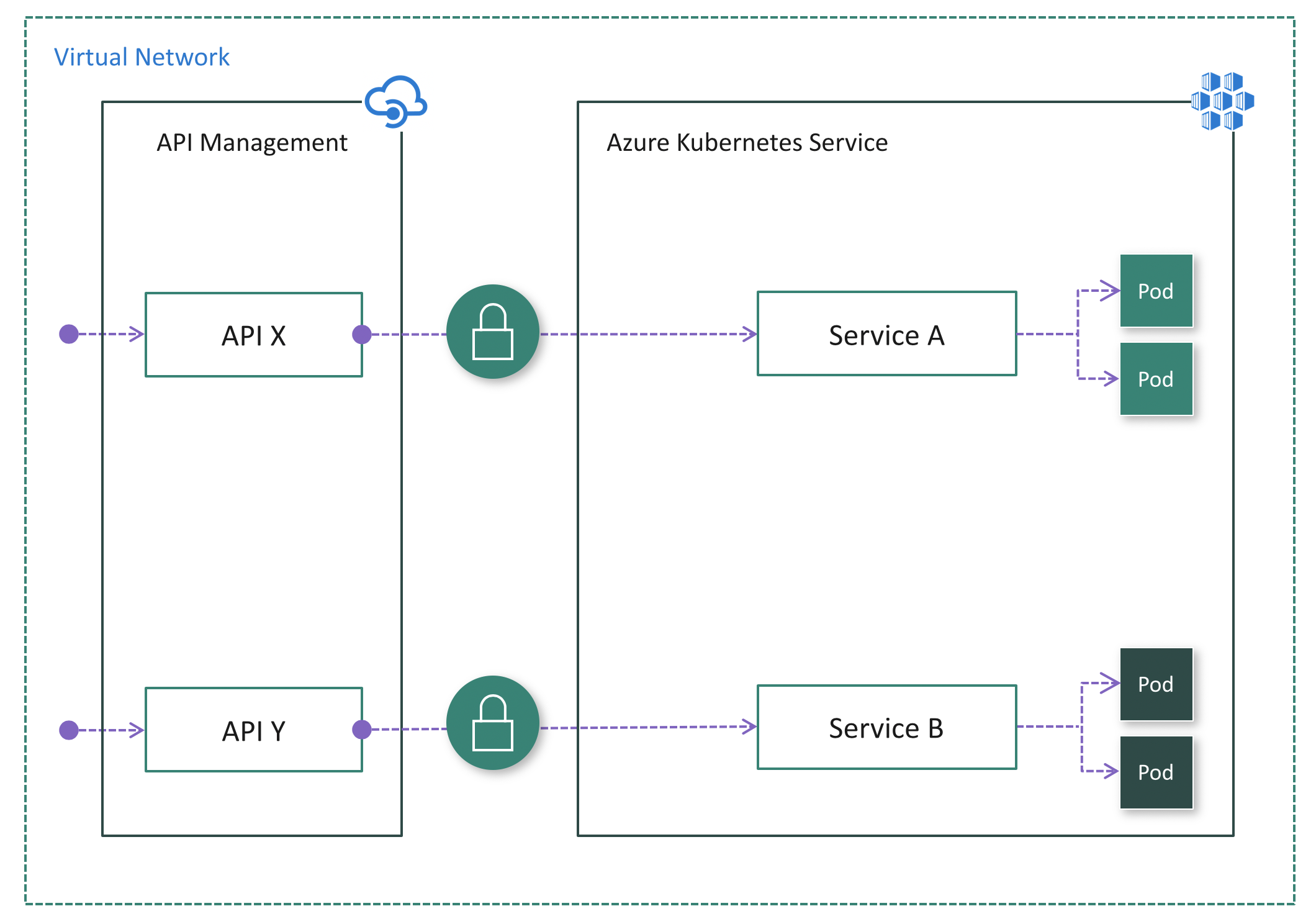
Pros:
- The most secure option because the AKS cluster has no public endpoint
- Simplifies cluster configuration since it has no public endpoint
- Ability to hide both API Management and AKS inside the VNet using the Internal mode
- Ability to control network traffic using Azure networking capabilities such as Network Security Groups (NSG)
Cons:
- Increases complexity of deploying and configuring API Management to work inside the VNet
Tiers
- Premium tier is designed for enterprises requiring access to private backends, enhanced security features, multi-region deployments, availability zones, and high scalability.
- Developer tier is an economical option for non-production use, while the Basic, Standard, and Premium tiers are production-ready tiers.
- V2 - A new set of tiers that offer fast provisioning and scaling, including Basic v2 for development and testing, and Standard v2 for production workloads. Standard v2 supports simplified connection to network-isolated backends.
- Consumption - The Consumption tier is a serverless gateway for managing APIs that scales based on demand and billed per execution. It is designed for applications with serverless compute, microservices-based architectures, and those with variable traffic patterns.
END