How I created this blog
I have tested multiple blogging frameworks, but I found that mkdocs is the simplest framework to generate documents and blog posts
Install mkdocs
pip install mkdocs
Install material theme
pip install mkdocs-material
Install blog plugin
https://liang2kl.github.io/mkdocs-blogging-plugin/
pip install mkdocs-blogging-plugin
Install plugin for back-link
I am using Obsidian to create the content of this blog. Hence I need a plugin to support back-link in Obsidian.
pip install mkdocs-roamlinks-plugin
Create a config files mkdocs.yml
site_name: VincentVu's blog
site_url: https://vincentvu.ca
docs_dir: content
site_dir: vincentvu.github.io

locale: en         # The locale for time localizations, default: system's locale
time_format: '%Y-%m-%d %H:%M:%S' # The format used to display the time
meta_time_format: '%Y-%m-%d %H:%M:%S' # The format used to parse the time from meta

theme:
  name: material

plugins:
  - search
  - roamlinks
  - blogging:
      dirs: # The directories to be included
        - blog
      size: 5
Start to create content of the site in folder content
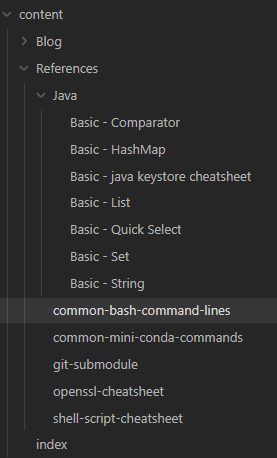
Build the site
mkdocs build
Serve the generated static site
Go to the site_dir (in the mkdocs.yml config file) to serve the static files
python -m http.server 8000